



















Nano Installation Guide
Your Tracker Nano arrives ready to use, with the device already powered up and ready for installation. Simply register your device, choose a suitable installation location and secure it safely within your vehicle.

Before You Start
Please have the following information ready:
- Vehicle registration number
- Tracker Nano IMEI number (the 15-digit number shown on your device)
- Broker reference number (available on your insurance documentation)
If you cannot locate your broker reference number, please contact your insurance broker directly.
IMPORTANT
-
Please register and install your Tracker Nano as soon as possible. Delaying installation may affect your insurance policy requirements.
-
Do not tamper with, unwrap or attempt to open the device unless specifically instructed to do so. This may damage the unit and could invalidate your policy.

Step 1: Register Your Tracker Nano
Before installation, you must register your device.
- Visit www.tracker.co.uk/NanoRegistration
- Follow the on-screen registration process.
- Once registration is complete, you can proceed with installation.
Registration only takes a few minutes.

Step 2: Choose A Suitable Installation Location
Your Tracker Nano is designed to be discreetly installed within your vehicle.
Installation Guidelines:
- Install the device in a concealed location.
- Choose a secure, flat mounting surface.
- Keep the device away from vehicle radios and electrical equipment.
- Avoid installing in obvious locations such as glove compartments or centre console.
- Ensure the device can be securely attached using the supplied fixing materials.
Before Securing The Device
- Use the supplied alcohol wipe to thoroughly clean and degrease the chosen mounting surface before applying the adhesive pads or Velcro fixings.
Step 3: Install Your Tracker Nano
Once registered and you've selected a suitable location, securely attach the Tracker Nano using the supplied fixing materials.
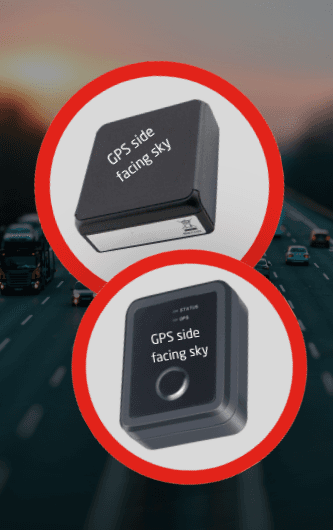
Installation instructions for the Tracker Nano devices shown in image :
- Mount the device on a flat, secure surface.
- Position it away from vehicle radios and electrical equipment.
- Ensure the wrapped side of the device is facing upwards, as shown in the image.
- This orientation helps the device acquire a GPS signal.
Installation complete. Your Tracker Nano is now active and ready to report.
Has my Nano device registered correctly?
Follow the steps within the registration portal to complete the setup process. Once registration is successful, you will see an on-screen confirmation message confirming that your Tracker Nano has been registered correctly and is connected to the Tracker network.
Where should I install my Tracker Nano?
The device should be installed in a secure, concealed location within your vehicle, away from radios and electrical equipment. Avoid installing it in obvious locations such as glove compartments or storage compartments that may be checked by thieves.
Where can I find my broker reference number?
Your broker reference number should be included within the documentation provided by your insurance broker. If you are unable to locate it, please contact your broker directly for assistance.
What should I do if my vehicle is stolen?
If your vehicle is stolen, follow these steps as soon as possible:
Contact the police and report the theft.
Obtain a crime reference number.
Call the Tracker 24/7 Control Centre on 0800 911 900.
Contact your insurance broker or insurer to notify them of the theft.
Early reporting helps start the recovery process as quickly as possible.
Can my Tracker Nano be transferred to another vehicle?
Tracker Nano can only be installed in the specific vehicle covered in your insurance policy. If you are looking to replace your current insured vehicle, please contact your Insurance Broker.